Choose an input
Choose Eye Blink or Light Blink from the launcher, using the mode cards or keyboard shortcuts. Eye Blink mode begins by calibrating to open eyes.
Turning visual signals into readable text.
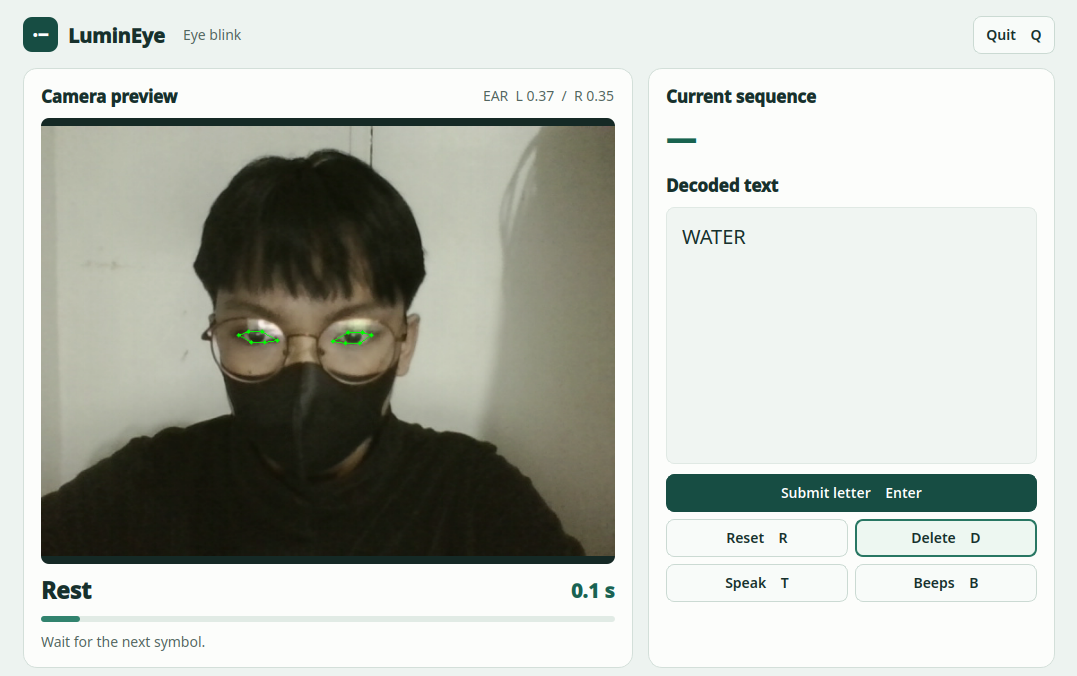
A PySide6 desktop app that converts eye blinks or blinking light into Morse code. It shows the live camera feed, the current sequence, and decoded text side by side.
The problem
Assistive communication can use visual signals as an alternative input. Turning a camera stream into readable text requires filtering noisy observations and managing a clear interaction sequence.
The workflow
Choose Eye Blink or Light Blink from the launcher, using the mode cards or keyboard shortcuts. Eye Blink mode begins by calibrating to open eyes.
Follow the phase label, countdown, and progress bar beside the camera preview. Blink during the active window to add a dot, dash, or space.
Use buttons or keyboard shortcuts to submit a letter, clear the sequence, delete the last character, or speak the text. Windows also supports Morse beeps.
The intelligent system
MediaPipe supplies facial landmarks for eye input. A YOLO light detector supports the alternate input mode. Timing and Morse decoding are handled by explicit application logic.
Engineering decisions
Eye-aspect-ratio measurements are smoothed and compared with calibrated thresholds. Consecutive-frame and duration checks filter blink events.
The workspace separates the camera and timing cues from the current sequence and decoded text. Invalid sequence feedback sits next to the controls.
The Qt interface displays the latest preview while a worker thread runs the camera session. Audio playback runs separately from the camera loop.
A vision interface needs a clear interaction model as well as a detector.